
A 65-inch TV looks impressive on the wall, but most living rooms still need somewhere to put the console, soundbar, and the slowly growing pile of streaming boxes. Picking the right 65 inch tv stand shapes how the whole room feels: it hides cables, holds weight, and frames your screen without competing for attention. This roundup covers eight stands that fit 65-inch screens (and a few that stretch to 70), sorted by room size, storage needs, and the kind of look you actually want to live with.
A Quick View Of The Lineup

WLIVE 58″ TV Stand for 65 Inch TVs (Black)

YITAHOME 59″ TV Stand with Power Outlet & LED Light (Black)

GreenForest TV Stand for 65 in TV, 55″ Entertainment Center
GreenForest TV Stand for 65 in TV, 55″ Entertainment Center

GreenForest TV Stand for 65 in TV, 55″ Entertainment Center

SONGMICS TV Stand for TVs Up to 70 Inches (BELLAH)

SONGMICS TV Stand for TVs Up to 70 Inches (BELLAH)

Huuger 63 Inch LED TV Stand with Power Outlets
The Strengths Of Each Pick
Small apartments tend to punish wide furniture, and that is exactly where this WLIVE cabinet earns its place. At 58 inches wide with a slim 14.6-inch depth, it slips into tight layouts where bulkier stands simply will not fit, while still giving a 65-inch screen a centered perch.
Mid-century cues show up in the slim metal legs and the wood-grain cabinet faces, a combination that reads warm without looking dated. Two enclosed cabinets keep the visual clutter out of sight, and a single open shelf handles the cable box or a soundbar.
What Stands Out
- Slim 14.6-inch depth fits narrow walls and studio layouts where deeper stands crowd the walkway.
- Two enclosed cabinets hide gaming gear, DVDs, and the tangle of remote controls you actually own.
- Metal legs raise the body off the floor, which makes vacuuming underneath less of a chore.
- Wood-grain finish pairs with both warm and cool wall colors, so redecorating later stays painless.
- Open central shelf is a natural home for a soundbar without eating into the cabinet space.
Things To Consider
- No built-in power outlets, so a separate surge protector usually ends up on the floor behind it.
- Engineered wood surfaces tend to show water rings, so coasters on the top shelf are wise.
Who It Suits Best
Renters and small-space dwellers who want mid-century character without sacrificing floor space.
Consider Something Else When
You need built-in outlets and LED mood lighting, in which case the YITAHOME 59″ TV Stand covers both.
Most living rooms hide a small power strip behind the TV stand, and the YITAHOME skips that whole step by baking the outlets in. A built-in power strip keeps the cable box, soundbar, and lamp all plugged in without a second accessory.
Compared with the WLIVE cabinet above, this one goes taller at 25.6 inches, which gives the screen more visual lift off the floor. Farmhouse-style lines and four open shelves make it easy to swap baskets and bins as your media collection shifts.
Where It Delivers
- Integrated power outlet removes the need for a separate strip tucked behind the unit.
- LED light strip adds ambient glow behind the screen without buying a third-party bias light.
- Movable shelves inside the cabinets let you adjust the height for taller gaming consoles.
- Four open cubbies and two cabinets cover the kind of mixed storage most media setups need.
Worth Noting
- At 25.6 inches tall, it sits higher than low-profile mid-century stands and may look chunky in low-ceiling rooms.
- LED controls may take a few minutes to learn, depending on how the included remote is set up.
Made For
Homeowners with full entertainment centers who want power and ambient light in one piece of furniture.
Where Another Pick Suits Better
Shoppers who want a longer top surface for a soundbar will find the Huuger 63 Inch LED TV Stand a touch more accommodating.
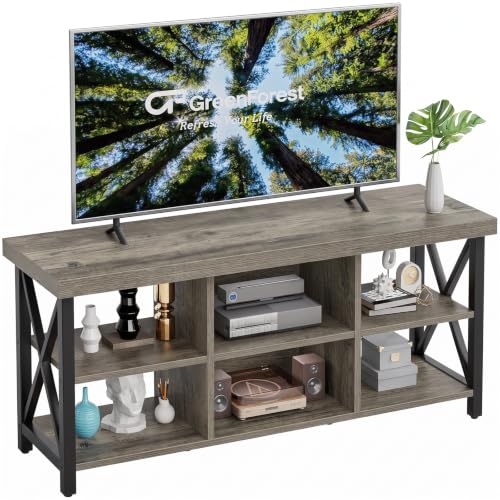
Gamers and media hoarders tend to run out of shelf space fast, and the first GreenForest on this list answers that with six open compartments arranged across a 55-inch top. The layout is wide enough to breathe but short enough to feel friendly in mid-size rooms.
Where the YITAHOME leans farmhouse, this GreenForest goes more open and modular, which keeps remotes and consoles easy to grab. An adjustable middle shelf lets you tune the height for a subwoofer or a stack of board games.
Everyday Wins
- Six open cubbies hold consoles, routers, and media without forcing anything behind a door.
- Adjustable central shelf makes room for taller subwoofers or sound bases.
- Open-back cable pass-through helps hide wires without buying a cable management kit.
- Compact 15-inch depth fits behind most sofas without pushing the room forward.
Room For Improvement
- No doors mean dust settles on consoles and games, so a weekly wipe-down becomes routine.
- Open layout displays every cable and box, which can read busy in minimalist rooms.
Best Suited To
Gamers and AV enthusiasts who like their gear visible, labeled, and easy to reach mid-session.
Not Your Match When
You want a more polished, closed-off look, in which case the SONGMICS BELLAH stand with fabric and steel doors makes a cleaner sightline.
This second GreenForest entry shares the same 55-inch footprint and six-cubby layout, but it leans further into tidy cable management. Owners commonly route cords through the rear cutout and end up with a cleaner wall than they started with.
The adjustable middle shelf adds flexibility, so swapping in a taller AV receiver mid-year does not force a furniture swap. The straightforward silhouette also tends to disappear visually, which is a plus in rooms with bolder art or wallpaper.
Notable Gains
- Built-in cable hole keeps HDMI and power lines routed straight down to the outlet.
- Adjustable central shelf adds clearance for taller receivers or center-channel speakers.
- Six open compartments keep accessories accessible during a movie or game session.
- Neutral finish works against both light and dark wall palettes without clashing.
Trade Offs
- No enclosed cabinets, so the unit shows every cable and dust bunny that drifts in.
- Assembly commonly takes a full afternoon, especially when working solo.
Perfect Match For
Anyone redoing a media wall who wants accessible storage with tidy cable routing out of the box.
Look Elsewhere When
Your setup includes a lot of equipment you prefer to hide, where the closed-door SONGMICS BELLAH with fabric panels works harder.
Some screens and sound setups are genuinely heavy, and this third GreenForest option focuses on load-bearing strength. A 220-pound top capacity gives plenty of headroom for a 65-inch panel plus a chunky center-channel speaker, and you may find that extra margin reassuring.
The 55-inch length and six-cubby storage stay familiar, so moving between the two earlier GreenForest entries in the lineup is painless. Where it differs is the underlying weight tolerance, which is what makes it the safer call for heavier older TVs or future upgrades.
Positive Points
- 220 lb load capacity supports heavier TVs and stacked speaker setups without bowing.
- Six open compartments keep streaming boxes, game consoles, and routers in easy reach.
- Adjustable shelf adapts to taller components, which is handy when gear changes.
Points To Note
- Higher weight rating often comes through in sturdier engineered wood, making the unit noticeably heavier to move.
- Open shelving means visible cables unless you add a strip or wrap kit separately.
Who Should Grab It
Shoppers with heavier screens or chunky center-channel speakers who want extra load margin built in.
Skip It When
Your living room runs warm and soft, in which case the SONGMICS BELLAH with faux leather brings a softer visual texture.
The first SONGMICS BELLAH entry trades plain wood for a hybrid build, mixing steel framing, engineered wood, and non-woven fabric panels. The result reads softer than a typical media console and softens the look of a hard-edged TV.
Compared with the open GreenForest shelves above, this one hides gear behind fabric-fronted doors, which suits anyone who wants the gear to disappear. An LED strip behind the unit fills the back wall with bias light during late-night viewing.
What Helps Most
- Fabric panels absorb sound slightly, which can take the edge off a hard, echoey room.
- App- and button-controlled LED strip offers thousands of color choices for movie nights.
- Steel frame gives the piece a sturdier feel than all-engineered-wood competitors.
- Supports TVs up to 70 inches, giving you room to upgrade without replacing the stand.
Honest Caveats
- Fabric panels can attract pet hair, so a lint roller tends to become part of the routine.
- LED app setup may take a few minutes the first time, depending on your phone.
Right Fit For
Style-focused shoppers who want a softer, fabric-fronted look and a customizable light show behind the screen.
A Better Fit Elsewhere
You run a fan-cooled gaming PC that needs more airflow, in which case the open GreenForest shelves let heat escape more freely.
The sibling BELLAH stand swaps the fabric panels for synthetic leather faces, giving the cabinet a slightly dressier finish. In a room with leather seating or warm wood tones, that material swap tends to read more cohesive than plain painted surfaces.
Where the fabric version above softens the look, this one adds a bit of structure, which can help balance a room full of soft textiles. The internal layout still supports media gear and cables, just behind a different front panel.
The Good Stuff
- Synthetic leather fronts wipe clean, which is handy in homes with kids and snacks nearby.
- Same LED lighting system as the fabric version, so you can match the mood across the room.
- Steel frame keeps the cabinet rigid even when fully loaded with consoles and media.
Soft Spots
- Leather-look surfaces can show fingerprints, so a quick microfiber pass becomes part of upkeep.
- Slightly more reflective than the fabric sibling, so it may not suit very matte, muted interiors.
Whose Shelf It Belongs On
Design-led living rooms that lean modern or transitional and want a hint of leather warmth in the media wall.
Reach For A Different Pick When
You want a tighter budget and easier assembly, where the WLIVE 58″ TV Stand keeps things simple and slim.
The Huuger closes the roundup with the most charging muscle: four standard outlets, two USB ports, and one Type-C port, all built into the back panel. Anyone juggling a phone, a tablet, a controller dock, and a streaming stick will appreciate not hunting for a free wall socket.
At 63 inches wide, it stretches longer than the GreenForest entries, which leaves room for a soundbar in front without crowding the screen. Compared with the YITAHOME, the power setup is more generous, and the top is wider for wider sound bases.
A Favorable Mix
- Four outlets plus USB-A and USB-C ports cover most living-room charging needs in one strip.
- 63-inch top fits soundbars and center channels without pushing the TV off-center.
- LED light strip adds bias light without buying a separate kit.
- Supports TVs up to 70 inches, giving headroom for future screen upgrades.
- Built-in power means fewer cables snaking across the floor to a wall outlet.
Small Caveats
- More built-in ports mean a slightly heavier cabinet, so plan a hand during assembly.
- LED controls live on the unit itself, so losing the small remote means manual tapping.
The Right Fit
Busy media hubs with multiple devices, soundbars, and family members who all need a charging spot.
Swap It Out When
You want a warmer, more residential look, where the WLIVE mid-century stand softens a tech-heavy wall.
Choosing A Stand That Fits Your Room And Gear
Width and depth matter more than people expect. Measure the wall, then add at least two inches on each side of the screen so the stand visually anchors the TV without crowding the edges. Depth matters for soundbars and for keeping the front edge clear of foot traffic, especially behind a sofa.
Weight and load capacity go hand in hand with screen size. A 65-inch panel can vary widely in weight depending on the panel tech, and the stand’s rating should cover both the screen and any center-channel speaker stacked on top. Built-in cable management, like the rear cutout on the GreenForest stands, saves an afternoon of zip-tying later.
Material choice drives the look. Engineered wood with a wood-grain finish reads warm and forgiving, while steel frames with fabric or faux-leather panels look more modern and resist scuffs. For households with kids, wipeable surfaces usually beat open shelves for daily cleanup.
Key Considerations Across These Picks
Pitfalls Shoppers Hit
One common slip is choosing a stand that is technically the right width for the screen but leaves no room for a soundbar in front. Leaving at least the depth of a soundbar between the screen and the front edge avoids that problem before it starts.
Another is ignoring cable paths. Even a beautiful cabinet looks messy if HDMI cables drape across the back of open shelves. Checking for rear cutouts or pre-drilled cable holes before you buy saves a retrofit later.
Why Top Tier Costs More
Higher-tier stands earn their price through material upgrades like steel frames, fabric or leather panels, and integrated LED bias lighting. You also tend to get more generous cable management and stronger load ratings, which matters most with heavier screens or stacked audio gear.
For most living rooms, mid-range stands handle the job well. The upgrade tends to pay off in spaces where the cabinet is on permanent display, or where the extra storage and charging ports replace a tangle of accessories you would otherwise buy separately.
Frequently Asked Questions
What width TV stand works for a 65-inch screen?
A stand between 55 and 65 inches wide usually looks balanced with a 65-inch screen, depending on how much overhang you prefer. Going slightly wider than the screen gives a more grounded, intentional look on the wall.
How much weight should a 65-inch TV stand support?
Aim for at least 30 percent more than the combined weight of the TV and any gear you plan to place on top. Stands like the GreenForest with a 220-pound rating leave comfortable headroom for heavier panels and center speakers.
Do I need a TV stand with built-in outlets?
A stand with built-in outlets is helpful if you own several plug-in devices and want to skip a separate power strip. It also keeps cables from trailing across the floor to a wall outlet.
Can a 65-inch TV stand also fit a 70-inch screen?
Some stands, like the SONGMICS BELLAH models, are rated for TVs up to 70 inches. Always check the listed maximum before pairing a 70-inch screen with a stand designed primarily for 65-inch use.
How do I hide cables behind a TV stand?
Rear cutouts, grommets, and pass-through holes make a noticeable difference, and the GreenForest entries include this in the design. Bundle cables with velcro straps and route them through a single hole for the cleanest look.
Closing Remarks
A 65-inch screen anchors the room, and the right stand keeps the rest of the setup honest. Match width and depth to the wall, check the load rating against your gear, and lean toward built-in outlets if your media pile is already growing. Browse the options above, and trust the dimensions over the photos: a stand that looks slim online can still dominate a small room.